BIND Vs LEXICAL
BIND VARIABLE :
-- are used to replace a single value in sql, pl/sql
-- bind variable may be used to replace expressions in select, where, group, order
by, having, connect by, start with cause of queries.
-- bind reference may not be referenced in FROM clause (or) in place of
reserved words or clauses.
LEXICAL REFERENCE:
-- you can use lexical reference to replace the clauses appearing AFTER select,
from, group by, having, connect by, start with.
-- you can’t make lexical reference in a pl/sql statmetns.
Flex mode and Confine mode
Confine mode
On: child objects cannot be moved outside their enclosing parent objects.
Off: child objects can be moved outside their enclosing parent objects.
Flex mode:
On: parent borders "stretch" when child objects are moved against them.
Off: parent borders remain fixed when child objects are moved against
them.
Diff Between Implicit and Explicit Cursors
1) Implicit: declared for all DML and pl/sql statements.
By default it selects one row only.
2) Explicit: Declared and named by the programmer.Use explicit cursor to individually process each row returned by a Multiple statements, is called ACTIVE SET. Allows the programmer to manually control explicit cursor in the
Pl/sql block
Execution Sequences of sql clauses.
a)Select…..
b)Group by…
c)Having…
d)Orderby..
Wednesday, July 11, 2007

performance problem in a Report
Tune the Report Main Query
Create indexes on columns used in where condition (eliminate full table scan)
set trace on in before report and set trace off in after report
Before Report:
srw.do_sql('alter session set sql_trace=true');
After Report:
srw.do_sql('alter session set sql_trace=false');
Trace file will be generated at location:
select value from v$parameter
where name = 'user_dump_dest';
Get the trace file location path
see execution plans in a trace file, you need to format the
generated trace file with tkprof statement.
Store Code statics in local drive.
Monday, July 09, 2007
Tuesday, July 03, 2007
Account Receivables
Account Receivables
1)Payment Tables in AR
The following tables stores cash and misc information
a)AR_CASH_RECEIPTS_ALL(CASH_RECEIPT_ID)
Stores 1 record for each receipt Entry
b)AR_CASH_RECEIPTS_HISTORY_ALL(CASH_RECEIPT_HISTORY_ID)
Stores all activities that is life cycle of receipt
c)AR_RECEIVABLES_APPLICATIONS_ALL(RECEIVABLES_APPLICATION_ID)
Stores Accounting information
D)AR_PAYMENT_SCHEDULES_ALL
F)AR_DISTRIBUTIONS_ALL(SOURCE_ID)
Stroes Account Distribution information
Setup Tables
a)AR_RECEIPTS_CLASSES(RECEIPT_CLASS_ID)
Contains Receipt class information.
b)AR_RECEIPTS_METHODS(RECEIPT_METHOD_ID)
Stores Receipt information ,Automatic and manually created receipts
c)AR_RECEIPTS_METHOD_ACCOUNTS
Monday, July 02, 2007
HRMS Date Track
Date Tracking
Date Tracking is a special feature in HRMS.important dynamic information in IS HRMS is date-tracked, including information about people, assignments, payrolls, compensation, and benefits.
When you log on to IS HRMS, your effective date is always today’s date.
To view information from another date or to make future-dated changes you must change your effective date.
The two DateTrack command icons on your window toolbar are:
• Alter Effective Date
• View DateTrack History
When you update date-tracked information, you are prompted to choose between Update and Correction options. If you select Update, IS HRMS changes the record as of your effective date but preserves the previous information.
If you select Correction, IS HRMS overrides the previous information with your new changes. You cannot create a record and then update it on the same day. If you try to do this, IS HRMS warns you that the old record will be overridden, and then changes Update to Correction. This occurs because DateTrack maintains records for a minimum of a day at a time.
View DateTrack History
To see all the changes made to a datetracked record over time, use DateTrack History. Click on [Full History] if you want to open a DateTrack History folder showing the value of each field between the from and to dates.
Account Paybles Tables
Account Paybles Tables
1)Invoice Details.
a)Ap_invoices_all(INVOICE_ID)
You can see the approved Invoices.
b)Ap_invoice_Distributions_all(INVOICE_ID)
To get Distributed Invoices information.
2)Invoice Transactions
a)ap_ae_headers_all(AE_HEADER_ID)
b)ap_ae_lines_all
Stores Distributed Accounting information.
3)Payment Schedule Information
a)ap_payment_schedules_all(INVOICE_ID)
Stores Amount remaing information and schedule payments for an invoice.
b)ap_invoice_payments_all(INVOICE_ID,CHECK_ID)
After compleing invoice payment information stores here.
4) Check Information.
a)ap_checks_all(CHECK_ID)
if you done the payment via check this information stores here.
b)AP_CHECK_FORMATS(Check_format_id)
When you create the invoice ie assciated with accouting infomation that information stores in this table.
c)AP_MC_INVOICES(invoice_id,set_of_book_id)
Contains Multiple invoice Currency information as well as Exchange Information.
d)AP_HOLDS_ALL
Holds invoice information you places
f)AP_CHRG_ALLOCATIONS_ALL
Used for AP links with the appropriate invoice distributins.
5)Approval information
a)AP_INV_APRVL_HIST_ALL(Approval history id,invoice_id)
Invoice approval information
b)AP_HISTORY_INVOICES_ALL(Invoice_id,VENDOR_iD)
All invoice history information stores here
c)AP_INVOICE_TRANSMISSIONS(JE_BATCH_ID)
When you post the invoice to GL This table will effected.
6)Terms
a)AP_TERMS_TL(TERMS_ID)
Contains Term information.
b)AP_INTERFACE_REJECTIONS
which could not be processed by Payables Open Interface Import
c)AP_BANK_ACCOUNTS_ALL
information about bank accounts
Tuesday, June 26, 2007
Purchase Order
Purchase Order Tables
1.PO_REQUISITION_HEADESR_ALL
2.PO_REQUISITION_LINES_ALL
When you raise the Requisition these tables effected (PO_REQUISITION_HEADER_ID) is the join between the tables
4.PO_REQ_DISTRIBUTION_ALL
It distribute the Requisition Account information.
5.PO_HEADERS_ALL (PO_HEADER_ID)
6.PO_LINES_ALL
When PO Created PO# stores in tables(PO_HEADER_ID) is the join for tables
7.PO_DISTRIBUTIONS_ALL
It will distribute the PO# Account information
8.PO_ACTION_HISTORY
Here you can get Approvals notification Status
9.PO_VENDORS_ALL(VENDOR_ID)
10.PO_VENDOR_SITES_ALL(VENDOR_SITE_ID)
11.PO_VENDOR_CONTACTS_ALL (VENDOR_CONTACT_ID)
Contacts Vendor ,Vendor site and conatct information (Vendor_id,Vendor_contact_id,VEDNOR_SITE_ID)
12.RCV_SHIPMENT_HEADERS_ALL(SHIPMENT_HEADER_ID)
common information about the source of your receipts or expected receipts
13.RCV_SHPMENT_LINES_ALL
when you issue the recept The recepent number , Shipment location stores in the table.
14.RCV_TRANSACTIONS(TRANSACTION_ID)
15.MTL_MATERIAL_TRANSACTIONS (TRANSACTION_ID)
Stores material transaction information (Transaction_id)
16.PO_Release_all
TO see the which purchase order is released.
17.PO_AGENTS
contains information about buyers and purchasing managers.
18.PO_NOTIFICATION_CONTROLS
contains information about the notification control rules for blanket, planned, and contract purchase orders.
19.PO_APPROVAL_LIST_HEADERS
list of approvers for the purchasing document used for requisition approvals only
20.PO_APPROVAL_LIST_LINES
approval list lines for the requisition approval list.
21.PO_POSITION_CONTROLS_ALL
assignment of control groups to jobs and/or positions
22.PO_DOCUMENT_TYPES_ALL_B
default, control, and option information you provide to customize
23.PO_CONTROL_GROUPS_ALL
control groups you use in your business
24.PO_RFQ_VENDORS
Information about the set of suppliers assigned to a request for quotation (RFQ)
25.PO_VENDOR_LIST_HEADERS(VENDOR_LIST_HEADER_ID)
stores information about supplier quotation lists you create.
26.FINANCIALS_SYSTEM_PARAMS_ALL
This Tables stores common and default information between AP and PO
Thursday, May 31, 2007
How to Use Hint
Select /*+ HINT */ Ename from emp where empid=7856
Where HINT is replaced by the hint text.When the syntax of the hint text is incorrect, the hint text is ignored and will not be used
ALL_ROWS
The ALL_ROWS hint explicitly chooses the cost-based approach to optimize a statement block with a goal of best throughput (that is, minimum total resource consumption).
FIRST_ROWS
The FIRST_ROWS hint explicitly chooses the cost-based approach to optimize a statement block with a goal of best response time (minimum resource usage to return first row). In newer Oracle version you should give a parameter with this hint: FIRST_ROWS(n) means that the optimizer will determine an executionplan to give a fast response for returning the first n rows.
CHOOSE
The CHOOSE hint causes the optimizer to choose between the rule-based approach and the cost-based approach for a SQL statement based on the presence of statistics for the tables accessed by the statement
RULE
The RULE hint explicitly chooses rule-based optimization for a statement block. This hint also causes the optimizer to ignore any other hints specified for the statement block. The RULE hint does not work any more in Oracle 10g.
Hints for Access Paths
FULL
The FULL hint explicitly chooses a full table scan for the specified table. The syntax of the FULL hint is FULL(table) where table specifies the alias of the table (or table name if alias does not exist) on which the full table scan is to be performed.
ROWID
The ROWID hint explicitly chooses a table scan by ROWID for the specified table. The syntax of the ROWID hint is ROWID(table) where table specifies the name or alias of the table on which the table access by ROWID is to be performed. (This hint depricated in Oracle 10g)
CLUSTER
The CLUSTER hint explicitly chooses a cluster scan to access the specified table. The syntax of the CLUSTER hint is CLUSTER(table) where table specifies the name or alias of the table to be accessed by a cluster scan.
HASH
The HASH hint explicitly chooses a hash scan to access the specified table. The syntax of the HASH hint is HASH(table) where table specifies the name or alias of the table to be accessed by a hash scan.
HASH_AJ
The HASH_AJ hint transforms a NOT IN subquery into a hash anti-join to access the specified table. The syntax of the HASH_AJ hint is HASH_AJ(table) where table specifies the name or alias of the table to be accessed.(depricated in Oracle 10g)
INDEX
The INDEX hint explicitly chooses an index scan for the specified table. The syntax of the INDEX hint is INDEX(table index) where:table specifies the name or alias of the table associated with the index to be scanned and index specifies an index on which an index scan is to be performed. This hint may optionally specify one or more indexes:
NO_INDEX
The NO_INDEX hint explicitly disallows a set of indexes for the specified table. The syntax of the NO_INDEX hint is NO_INDEX(table index)
INDEX_ASC
The INDEX_ASC hint explicitly chooses an index scan for the specified table. If the statement uses an index range scan, Oracle scans the index entries in ascending order of their indexed values.
INDEX_COMBINE
If no indexes are given as arguments for the INDEX_COMBINE hint, the optimizer will use on the table whatever boolean combination of bitmap indexes has the best cost estimate. If certain indexes are given as arguments, the optimizer will try to use some boolean combination of those particular bitmap indexes. The syntax of INDEX_COMBINE is INDEX_COMBINE(table index).
INDEX_JOIN
Explicitly instructs the optimizer to use an index join as an access path. For the hint to have a positive effect, a sufficiently small number of indexes must exist that contain all the columns required to resolve the query.
INDEX_DESC
The INDEX_DESC hint explicitly chooses an index scan for the specified table. If the statement uses an index range scan, Oracle scans the index entries in descending order of their indexed values.
INDEX_FFS
This hint causes a fast full index scan to be performed rather than a full table.
NO_INDEX_FFS
Do not use fast full index scan (from Oracle 10g)
INDEX_SS
Exclude range scan from query plan (from Oracle 10g)
INDEX_SS_ASC
Exclude range scan from query plan (from Oracle 10g)
INDEX_SS_DESC
Exclude range scan from query plan (from Oracle 10g)
NO_INDEX_SS
The NO_INDEX_SS hint causes the optimizer to exclude a skip scan of the specified indexes on the specified table. (from Oracle 10g)
Wednesday, May 30, 2007
Display Module Wise Reports
Display Module Wise Reports
SELECT fa.application_short_name, fcpv.user_concurrent_program_name,
description,
DECODE (fcpv.execution_method_code,
'B', 'Request Set Stage Function',
'Q', 'SQL*Plus',
'H', 'Host',
'L', 'SQL*Loader',
'A', 'Spawned',
'I', 'PL/SQL Stored Procedure',
'P', 'Oracle Reports',
'S', 'Immediate',
fcpv.execution_method_code
) exe_method,
output_file_type, program_type, printer_name, minimum_width,
minimum_length, concurrent_program_name, concurrent_program_id
FROM fnd_concurrent_programs_vl fcpv, fnd_application fa
WHERE fcpv.application_id = fa.application_id
ORDER BY 1
SELECT fa.application_short_name,DECODE (fcpv.execution_method_code,'B', 'Request Set Stage Function','Q', 'SQL*Plus','H', 'Host','L', 'SQL*Loader','A', 'Spawned','I', 'PL/SQL Stored Procedure','P', 'Oracle Reports','S', 'Immediate',fcpv.execution_method_code) exe_method,COUNT (concurrent_program_id) COUNTFROM fnd_concurrent_programs_vl fcpv, fnd_application faWHERE fcpv.application_id = fa.application_idGROUP BY fa.application_short_name, fcpv.execution_method_codeORDER BY 1
Wednesday, April 11, 2007
OM Tables
Entered
oe_order_headers_all 1 record created in header table
oe_order_lines_all Lines for particular records
oe_price_adjustments When discount gets applied
oe_order_price_attribs If line has price attributes then populated
oe_order_holds_all If any hold applied for order like credit check etc.
Booked
oe_order_headers_all Booked_flag=Y Order booked.
wsh_delivery_details Released_status Ready to release
Pick Released
wsh_delivery_details Released_status=Y Released to Warehouse (Line has been released to Inventory for processing)
wsh_picking_batches After batch is created for pick release.
mtl_reservations This is only soft reservations. No physical movement of stock
Full Transaction
mtl_material_transactions No records in mtl_material_transactions
mtl_txn_request_headers
mtl_txn_request_lines
wsh_delivery_details Released to warehouse.
wsh_new_deliveries if Auto-Create is Yes then data populated.
wsh_delivery_assignments deliveries get assigned
Pick Confirmed
wsh_delivery_details Released_status=Y Hard Reservations. Picked the stock. Physical movement of stock
Ship Confirmed
wsh_delivery_details Released_status=C Y To C:Shipped ;Delivery Note get printed Delivery assigned to trip stopquantity will be decreased from staged
mtl_material_transactions On the ship confirm form, check Ship all box
wsh_new_deliveries If Defer Interface is checked I.e its deferred then OM & inventory not updated. If Defer Interface is not checked.: Shipped
oe_order_lines_all Shipped_quantity get populated.
wsh_delivery_legs 1 leg is called as 1 trip.1 Pickup & drop up stop for each trip.
oe_order_headers_all If all the lines get shipped then only flag N
Autoinvoice
wsh_delivery_details Released_status=I Need to run workflow background process.
ra_interface_lines_all Data will be populated after wkfw process.
ra_customer_trx_all After running Autoinvoice Master Program for
ra_customer_trx_lines_all specific batch transaction tables get populated
Price Details
qp_list_headers_b To Get Item Price Details.
qp_list_lines
Items On Hand Qty
mtl_onhand_quantities TO check On Hand Qty Items.
Payment Terms
ra_terms Payment terms
AutoMatic Numbering System
ar_system_parametes_all you can chk Automactic Numbering is enabled/disabled.
Customer Information
hz_parties Get Customer information include name,contacts,Address and Phone
hz_party_sites
hz_locations
hz_cust_accounts
hz_cust_account_sites_all
hz_cust_site_uses_all
ra_customers
Document Sequence
fnd_document_sequences Document Sequence Numbers
fnd_doc_sequence_categories
fnd_doc_sequence_assignments
Default rules for Price List
oe_def_attr_def_rules Price List Default Rules
oe_def_attr_condns
ak_object_attributes
End User Details
csi_t_party_details To capture End user Details
Sales Credit Sales Credit Information(How much credit can get)
oe_sales_credits
Attaching Documents
fnd_attached_documents Attched Documents and Text information
fnd_documents_tl
fnd_documents_short_text
Blanket Sales Order
oe_blanket_headers_all Blanket Sales Order Information.
oe_blanket_lines_all
Processing Constraints
oe_pc_assignments Sales order Shipment schedule Processing Constratins
oe_pc_exclusions
Sales Order Holds
oe_hold_definitions Order Hold and Managing Details.
oe_hold_authorizations
oe_hold_sources_all
oe_order_holds_all
Hold Relaese
oe_hold_releases_all Hold released Sales Order.
Credit Chk Details
oe_credit_check_rules To get the Credit Check Againt Customer.
Cancel Orders
oe_order_lines_all Cancel Order Details.
Tuesday, March 06, 2007
Thursday, January 18, 2007
Oracle Applications Video Clips
Oracle Applications Video Clips
http://gehlpad.oracleicenter.com/pls/survey/demo.lpdemo7.launch?p_id=18905
Wednesday, January 03, 2007
Oracle Approvals Management (AME)
Oracle Approvals Management
The purpose of Oracle Approvals Management (AME) is to define approval rules that determine the approval processes for Oracle applications. Rules are constructed from conditions and approvals.
• Number
• Date
• String
• Boolean
• Currency
Boolean attributes are either true or false.
• Ordinary
• Exception
• List-modification
The differences between ordinary and exception conditions
To create a condition:
Forms Personalization-Moving to another instance
Forms Personalization-Moving to another instance
Download for a specific form:
FNDLOAD
Download all personalizations
FNDLOAD
Upload
FNDLOAD
Thursday, December 28, 2006
Oracle Forms Personalization
Oracle has introduced a mechanism which revolutionizes the way the forms can be customized to fulfill the customer needs.Oracle Applications has provided a custom library using which the look and behavior of the standard forms can be altered, but the custom library modifications require extensive work on SQL and PL/SQL.Oracle Applications release 11.5.10 has provided a user interface “Personalization form” which will be used to define the personalization rules.
By default the “Personalize” menu is visible to all the users; this can be controlled with help of
profile options.By setting up the below profile options,access to the Personalize menu can
be limited for the authorized users.
Utilities: Diagnostics = Yes/No
Hide Diagnostics = Yes/No
invoking the Personalization form click on “Help -> Diagnostics -> Custom Code -> Personalize”

The form mainly contains four sections.
• Rules
• Conditions
• Context
• Actions
Rules:
Each rule contains a sequence number and the description. The rule can be activated or de-activated using the “Enabled” checkbox.
Conditions
Conditions decide the event the rule to be executed. Each condition mainly contains three
sections i.e. Trigger Event, Trigger Object and Condition..
Context manages to whom the personalization should apply. This is similar to the concept of
using profile options in Oracle Application
Actions decide the exact operation to be performed when the conditions and context return true
during the runtime.
Change the “Order Type” label to “Claim Type”
1.Open the Sales Order Form
2.Open the Personalization form using the navigation “Help Diagnostics Custom Code Personalize”
3.Enter the sequence number as 10 and description as “Change the Order Type Prompt to
Claim Type”
4.Select the Trigger Event as “WHEN-NEW-FORM-INSTANCE”
5.Select or enter the following values under Context section
• Level = Responsibility
• Value = Order Management Super User

On Actions tab, enter or select the following values
• Sequence = 10
• Type = Property
• Description = Order Type to Claim Type
• Language = All
• Enabled = Yes

Click on “Apply Now” button
Close both the forms and reopen the Sales Order form
The Order Number label should reflect as Claim Number

Tuesday, December 12, 2006
Thursday, November 09, 2006
Concept of BPEL
What is BPEL
Oracle BPEL Process Manager provides a framework for easily designing, deploying, monitoring, and administering processes based on BPEL standards.
- Web service standards such as XML, SOAP, and WSDL
- Service-oriented architecture (SOA)
- Audit trails for tracing business flow history
Event timeouts and notifications
BPEL Designer?
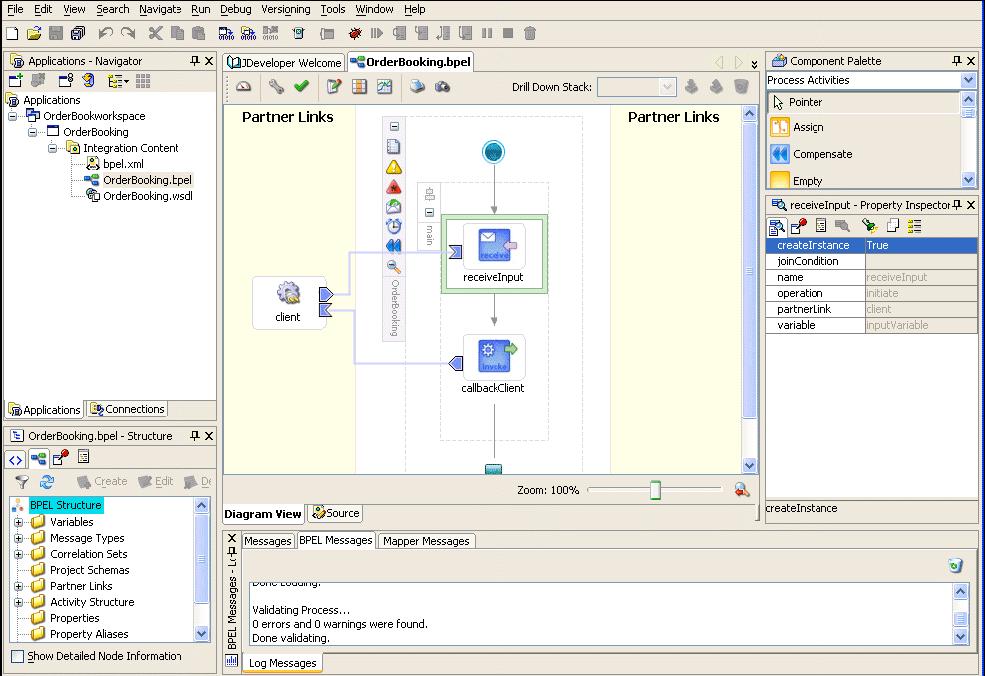
Oracle BPEL Process Manager provides support for two types of BPEL designer environments for graphically designing BPEL processes:
1.JDeveloper BPEL Designer
2. Eclipse BPEL Designer
BPEL processes by dragging and dropping elements (known as activities) into the process and editing their property pages eliminatewrite BPEL code.BPEL designers can deploy the developed processes directly to Oracle BPEL Console.BPEL Designer is integrated with Oracle JDeveloper 10g. Oracle JDeveloper 10g is an integrated development environment (IDE) for building applications and Web services using Java, XML, and SQL standards.
BPEL Process Manager Components
Oracle BPEL Process Manager consists of the three components
1.Design 2.Deployment 3.Management
Design: You can design and Deploy the BPEL Processes using darg and drop and integrate BPEL processes with external services.
2.Deployment :Once design is complete, you deploy the process from the design environment to Oracle BPEL Server. If deployment is successful, you can run and manage the BPEL process from Oracle BPEL Console.
Tuesday, November 07, 2006
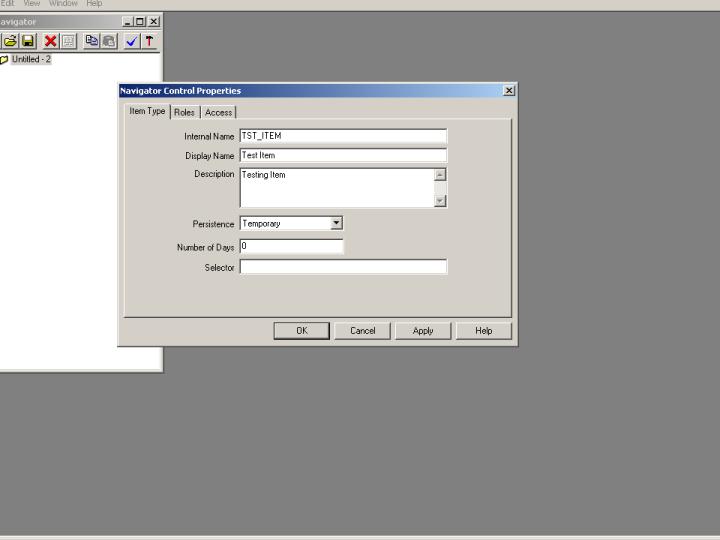
Creating Sample Workflow

Pass all parameters
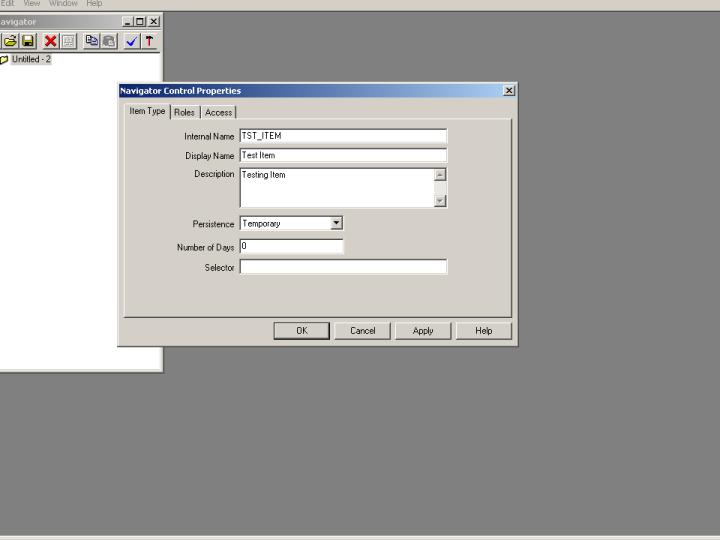
Internal name:TST_ITEM
Disaply Item:Test Item
Description:Testing Item
Then click on Apply
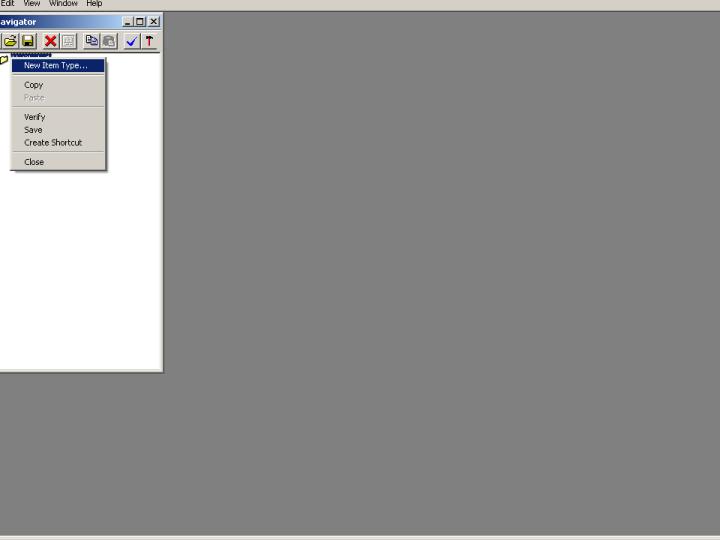
Expand the Navigator Right Click on Attribute
Monday, November 06, 2006
Learn Workflow
Concept of Oracle Workflow